Someone preparing for an immigration process needs to keep track of tasks, forms, dates, and reliable sources. Finding an official page is one step; organizing what to do next is another.
My goal is to make that organizational work easier to follow on a phone. The app keeps progress visible and official resources close to the task at hand.
My contribution
From workflow to working interface.
My work covers the mobile interface, structured checklist flows, local data handling, backend integration, localization, subscription functionality, and privacy controls.
I’ve also worked on automated checks and release preparation. This is an independent software project, with product decisions and implementation developed together.
02 / The product
A place to see the next step.
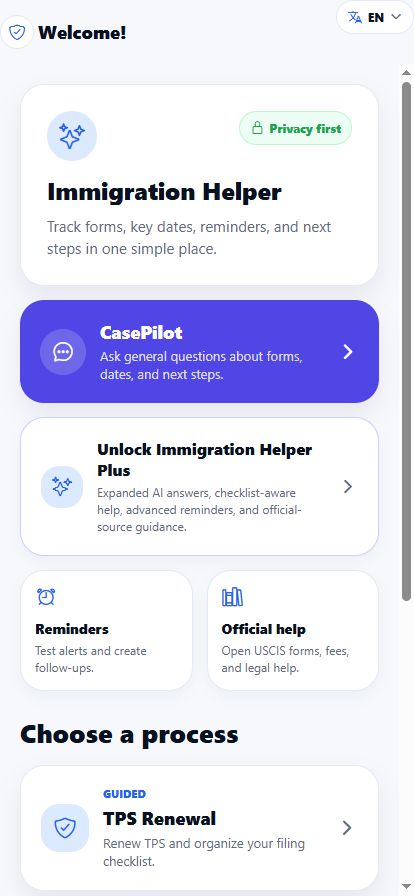
The current implementation includes guided flows for TPS renewal, work authorization, and travel authorization, alongside reminders and official resources.
01
Choose a process
Open a focused checklist with relevant forms and resource links.
02
Keep track
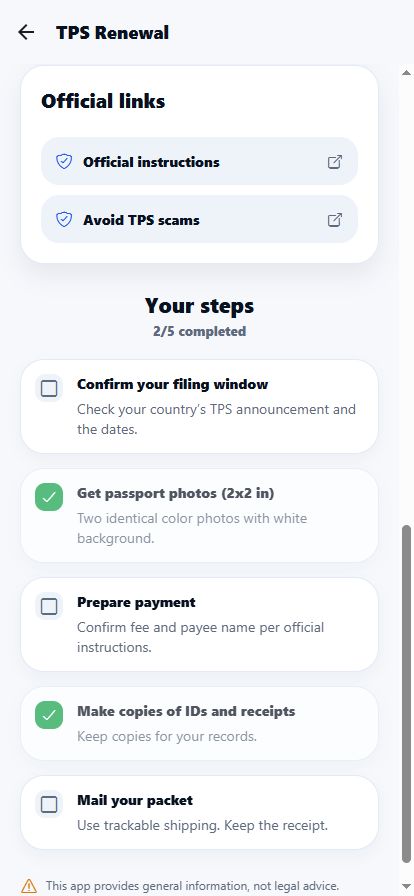
Save progress and target dates, with local reminder functionality.
03
Find information
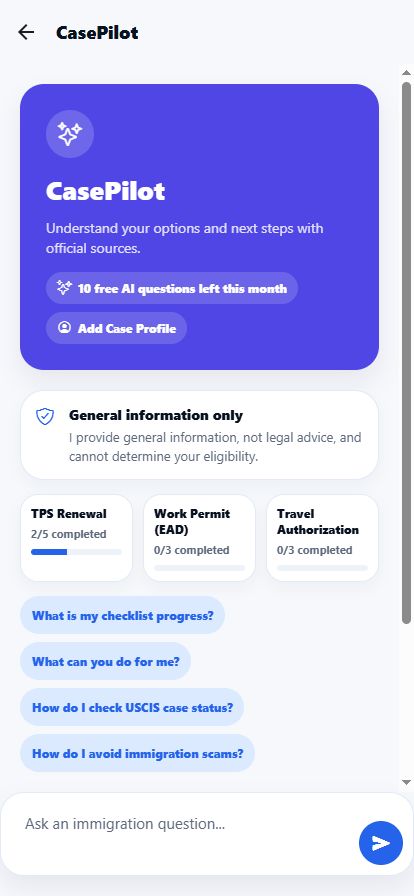
Use official resources or ask CasePilot a general question.
The AI entry point brings suggested questions and optional checklist context into the same workflow. Its scope is general information, with links to official sources.
A process becomes a visible set of tasks, with saved progress and official resource links. This screenshot uses sample progress; it contains no real case details.
Screenshots captured on 18 October 2026 from the app’s mobile web development preview. They show sample data and are not final native App Store screenshots. The CasePilot image shows its start screen.
03 / Design & engineering decisions
The boundaries shape the product.
The most important decisions concern what the app stores, when it goes online, and how it presents information.
01
Keep the scope clear
Checklists organize tasks and link to official instructions. CasePilot provides general information with source references. The product does not determine eligibility or replace qualified legal advice, and it makes its independence from government agencies explicit.
02
Make online AI an explicit choice
CasePilot requires first-use consent. Sharing saved checklist context is a separate option that starts off. The implementation checks for common sensitive identifiers before sending a request, and users can withdraw AI permission.
The native File Vault stores imported documents on the device. Those files are kept out of the CasePilot request flow.
03
Ground answers in official material
A Node.js service handles AI requests, keeping the private provider key on the server. Retrieval uses a packaged USCIS corpus and search restricted to official domains. Source checks and an additional evidence-review step help decide whether an answer can be shown.
This introduces a real tradeoff: more verification work adds latency and cost. An unavailable result needs to be handled clearly when the evidence cannot be verified.
04
Make language support testable
The interface includes 30 languages. Automated checks compare translation keys and placeholders, and the backend has language-specific response checks. Interface translation and live AI performance require separate validation; translated screens alone do not establish answer quality.
04 / How it fits together
A mobile client with a separate AI service.
On the device
React Native + Expo
Checklists, local state, reminders, language preferences, and the native File Vault.
Request validation, usage controls, source retrieval, AI generation, and evidence checks.
OpenAI API · Official sources · Server-side credentialsOptional paid features
RevenueCat integration
Plus subscription UI, entitlement handling, and purchase restoration flows.
Final native purchase and restore verification remains pending
05 / Outcome so far
A working development version. A clear path to release.
The project brings the core workflow and AI entry point together in one app. Automated coverage includes consent behavior, sensitive-data checks, localization, source handling, File Vault logic, and subscription state.
The work demonstrates how I translate a broad problem into concrete flows, connect a mobile interface to backend services, and define checks for behavior that matters.
It is still in development and is not available on the App Store. This case study documents the implementation so far; user adoption and impact have not been measured.
Explore the work
Built by Deniz Izci.
Technical business analysis, product thinking, and hands-on software development.
Project snapshot: 18 October 2026. Immigration Helper is independent of USCIS and other government agencies. It provides organizational tools and general information.